
Yes, the Enerdrive DC2DC is compatible with vehicles installed with a smart alternator. Please take the following steps when installing a DC2DC on a vehicle with a smart alternator:
Connect DC2DC negative terminal to the chassis
In most DC2DC installations, we recommend that you wire the negative DC2DC vehicle input terminal directly to the start battery. In a smart alternator installation, we still recommend that you run the negative cable to the engine bay, but attach it at the same point where the start battery negative cable is connected to the chassis instead of to the start battery directly.
Activate "Priority" Mode on the DC2DC
The use of "Priority" mode on the DC2DC allows the unit to begin charging from the start battery at a much lower voltage (12.3V instead of 13.2V). This lowered start up voltage allows the DC2DC to compensate for the lower output voltage of smart alternators.
There are four ways to activate priority mode, though it is strongly recommended that you use the first or third method.
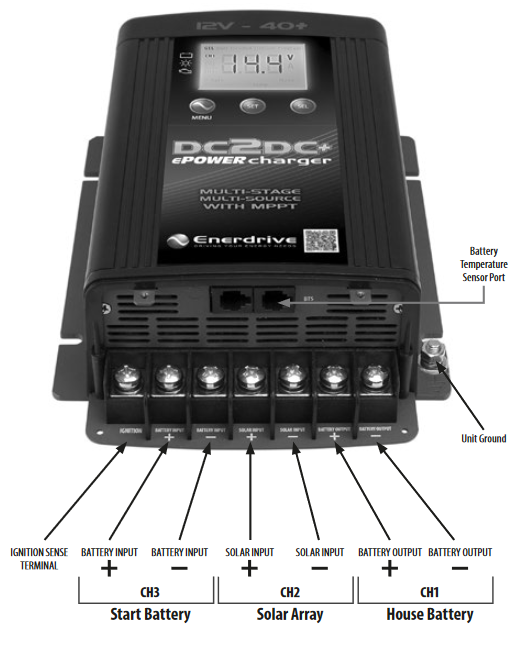
- The ideal way to activate "Priority" mode is to directly wire the "Ignition Sense Terminal" on the DC2DC to the vehicle ignition. This will place the DC2DC into "Priority" mode automatically whenever the ignition is switched on.
- Alternatively, a small jumper wire connecting the "Ignition Sense Terminal" to the positive "Battery Input" terminal will activate priority mode whenever the start battery is connected to the DC2DC (even if the vehicle is off and the alternator is not charging the start battery). This setup can be used with towed applications where the DC2DC is disconnected from the vehicle when it is parked, but not with 4WD or marine applications. Keep in mind that because the DC2DC is always running at a lower start up voltage in this application, it will continue to drain you start battery while the vehicle is off (which can be problematic if your vehicle is parked but not disconnected it from the trailer).
- A less risky alternative the second option is to use the same jumper wire method paired with a high current relay located at the start battery. This relay is then wired to the ignition and energizes only when the vehicle is running. This method prevents you from leaving your trailer plugged in and accidentally flattening your start battery, but also saves you from the trouble of running an ignition sense wire all the way from your trailer to the vehicle engine bay.
- Finally, Priority mode can be switched on manually by holding the "SET" button on the DC2DC for more than 10 seconds. This will make the "Priority" icon appear on the display and continue until it is manually switched off again. This method also comes with the increased risk of flattening your start battery as it requires you to remember to manually switch "Priority" mode off when the vehicle is not running.
For more information on smart alternator installations, check out our DC2DC video series here.
Comments
0 comments
Article is closed for comments.