
There are two different ways of reading the fault codes on your ePOWER Industrial charger depending on the type of display your charger has. The methods for reading the displays and meanings of each error code are listed below.
Method 1: ePOWER Industrial with Digital Display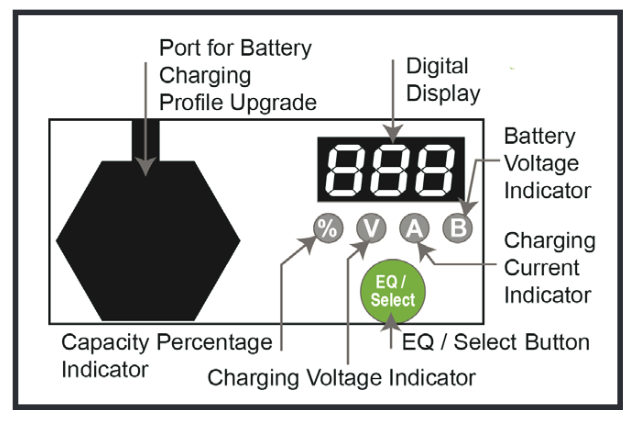
| Blinking Frequency | Fault Cause | Solution |
| E01 bAt | The battery is not connected, the battery is connected in reverse, or the battery is damaged | 1. Check that the battery connection is correct 2. Check the charger connection is correct 3. Check each battery is in good condition. |
| E02 AC | Abnormal AC Power Input (Voltage) | 1. Check AC input cord is connected between charger and AC outlet 2. Make sure the AC plug is tightly inserted into AC outlet |
| E03 Hot | Charger High Temperature Protection |
1. Charger shuts down and enters protection mode due to the charger/environmental temperature being too high. Please place charger in a well ventilated environment 2. Disconnect the charger and wait 15-20 minutes before reconnecting for charging |
| E04 bAt | Battery High Temperature Protection | 1. Charger will reduce output current and stop charging when the battery temperature exceeds 50˚C 2. When the battery temperature drops, the charger will reset automatically |
| E05 Err | Internal error in product | Contact Enerdrive support for assistance |
| E06 bAt | Battery Voltage is too high | Check and assure that the correct output battery voltage is connected. |
Method 2: ePOWER Industrial with 4 LED Display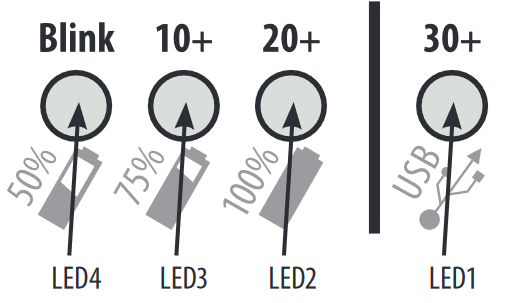
When a fault occurs on an ePOWER Industrial charger with the 4 LED display, the three state of charge LEDs will blink at the same time. The number of blinks will indicate the error code. A list of errors and solutions can be found in the table below
| Blinking Frequency (every 4 sec) | Fault Cause | Solution |
| 1 | The battery is not connected or voltage is too low | 1. Check the battery connection is correct 2. Check the charger connection is correct 3. Check each battery is in good condition. |
| 2 | Abnormal AC Power Input (Voltage) | 1. Check the AC input cord is connected between the charger and AC outlet 2. Make sure the AC plug is tightly inserted into the AC outlet |
| 3 | Charger High Temperature Protection |
1. Charger shuts down and enters protection mode due to the charger/environmental temperature being too high. Please place the charger in a well ventilated environment 2. Disconnect the charger and wait 15-20 minutes before reconnecting for charging |
| 4 | Battery High Temperature Protection | 1. Charger will reduce output current and stop charging when the battery temperature exceeds 50˚C 2. When the battery temperature drops, the charger will reset automatically |
| 5 | Output current is too large | Contact Enerdrive support for assistance |
| 6 | Battery Voltage is too high | Check and assure that the correct output battery voltage is connected. |
Comments
0 comments
Please sign in to leave a comment.