
Your ePOWER Industrial charger will display the charge profile code when it is first connected to power. How the charger displays the charge profile code will depend on whether you have a model equipped with an LCD digital display or a model that has only 4 LEDs. The charge profile can be read using one of the following methods:
Method 1: ePOWER Industrial with Digital Display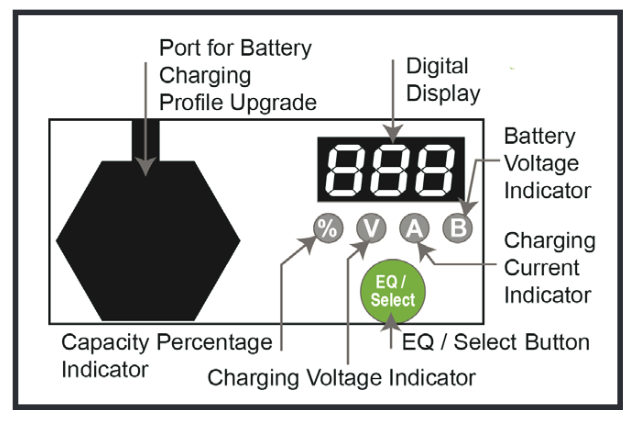
The digital display will show the following in turn when it turns on: AC XXX (Current AC input voltage), CPU X.XX (corresponding software version number, b XX (Current charging profile code).
Method 2: ePOWER Industrial with 4 LED Display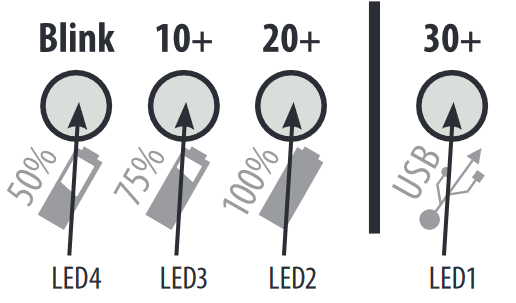
The charge profile will display twice when the charger turns on. The "Blink" LED will flash a number of times equal to the loaded profile number. The other LEDs will light up solid to indicate if the profile is higher than 10, 20 or 30. For example, if the charger has profile 38 loaded, then the "30+" LED will show solid green and the "Blink" LED will flash 8 times. If charge profile 2 was loaded, then the "Blink" LED would flash twice and no other LEDs would light up.
Once you have determine what charge profile number is loaded, you can refer to the list of available charge profiles here.
READY TO SHIP WITHIN 1–2 BUSINESS DAYS
ENERDRIVE IS NOW DOMETIC | LIFETIME OF UNRIVALED LOCAL TECHNICAL SUPPORT
ENERDRIVE IS NOW DOMETIC | LIFETIME OF TECHNICAL SUPPORT
Comments
0 comments
Please sign in to leave a comment.