
You do not need to install the included temperature sensor if you are using your ePOWER AC charger to charge a lithium battery. For Gel, AGM, and Flooded batteries, the temperature sensor will enable your ePOWER AC Charger to adjust its charging algorithm to compensate for changes in temperature and ensure your batteries are charged optimally. To install the sensor, simply connect the RJ12 plug into the BTS port (not the Remote port) on your ePOWER AC charger and attach the ring terminals to the negative terminal of the battery bank. Installing the sensor will override the manual settings you choose while programming.
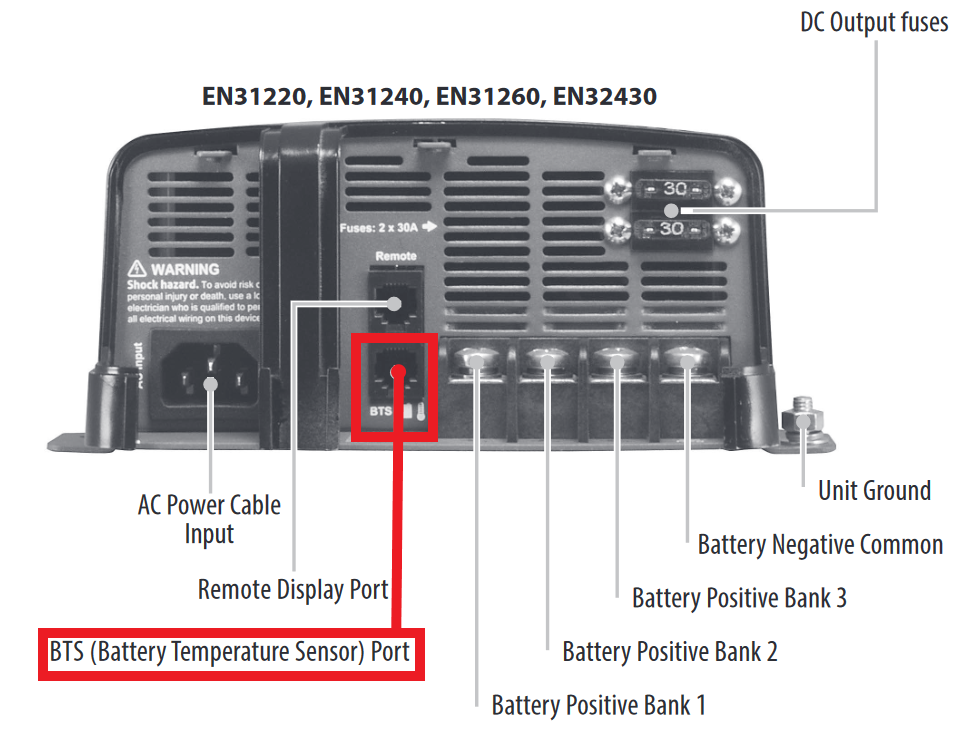
With the temperature sensor connected, your ePOWER charger will make the following adjustments for Flooded, Gel, and AGM batteries:
| Battery Temperature | Battery Charging Voltage Adjustment from 25˚C | |
| Flooded and Gel type | AGM type | |
| < 25˚C | +0.027V/˚C | +0.021V/˚C |
| 25˚C | 0V | 0V |
| > 25˚C | -0.027V/˚C | -0.021V/˚C |
You can also manually set the batter temperature on the charger by holding the "MENU" button and navigating through the programming screen (you will not be given the temperature prompt if you select Lithium). Plugging in the temperature sensor will override manual settings. The manual temperature settings are listed in the table below:
| Temperature Setting | Recommended for Battery Temperature | Battery Type | Voltage Adjustment from 25˚C normal setting |
| Low (Lo) | < 5˚C | Gel, Flooded | 0.675V |
| AGM | 0.525V | ||
| Normal (nor) | > 5˚C and < 30˚C | Gel, Flooded | 0V |
| AGM | 0V | ||
| High (Hi) | > 30˚C | Gel, Flooded | -0.27V |
| AGM | -0.21V |
Comments
0 comments
Please sign in to leave a comment.